Day-part templates
Save a pattern once, reuse it everywhere
If you find yourself setting the same day-and-time pattern over and over — "weekday breakfast", "overnights", "weekends only" — save it as a template and apply it with one click.
Making a template
Tools → Day Part Templates opens the template editor. Give a pattern a name, check the hours you want, and save it.
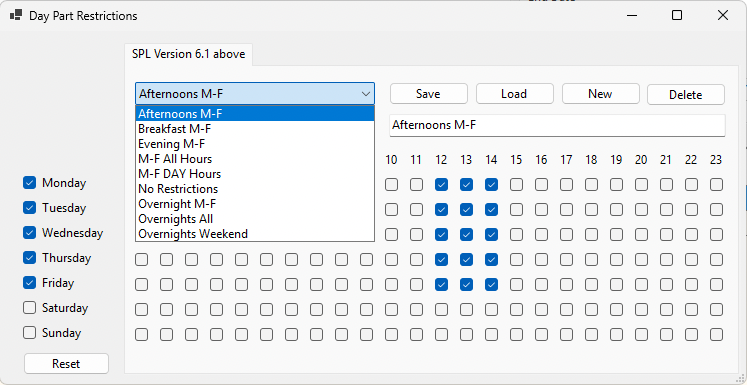
Using one
Back in the restrictions window, pick a template from the drop-down and it fills in the grid for you.
Active and inactive
A template can be switched off with the Active checkbox. An inactive template disappears from the drop-down but stays in the editor, so you can bring it back later.
Useful for seasonal patterns you only want visible part of the year.
The templates that come with VSE2
Nine are ready to use out of the box:
- Breakfast M-F
- Afternoons M-F
- Evening M-F
- Overnight M-F
- Overnights All
- Overnights Weekend
- M-F All Hours
- M-F Day Hours
- No Restrictions
Templates are only available for the newer StationPlaylist format (6.1 and above). If your station is on an older version you can still set day-part restrictions by hand — templates just are not available.