Using VSE2 with RadioDJ
Editing cue points in a RadioDJ library
If your station runs RadioDJ, VSE2 can edit its cue points directly — on the waveform, the same way you would for any other song.
Setting it up
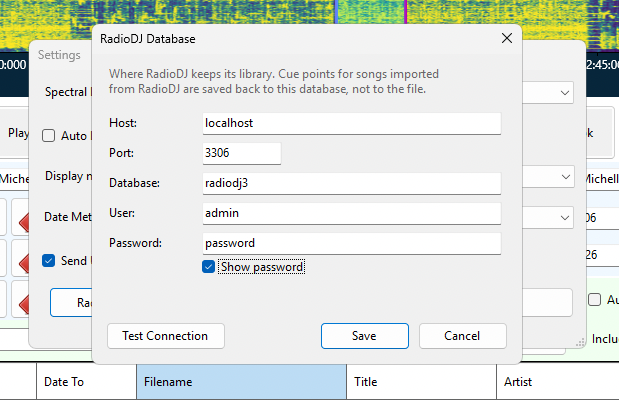
Go to Settings, click RadioDJ Database ..., and fill in where your RadioDJ database lives: the computer, the database name, and a username and password.
Click Test Connection. If it goes green, you are ready. Ask whoever set up RadioDJ if you do not know these details.
Adding songs
Click Add from RadioDJ. You will see your RadioDJ library, with every song's existing cue points listed — so you can tell at a glance which have been done and which have not.
Select the ones you want and click Add. They appear in the normal list, marked RadioDJ in the Source column.
Editing them
Exactly as any other song. Double-click, edit the markers, save.
What gets saved, and where
Cue points go back into the RadioDJ database. Your actual audio files are not touched at all.
Cue points are the only thing VSE2 changes in RadioDJ. Artist, title, album, start dates and day-part restrictions are left alone — edit those in RadioDJ itself. If you change one of them on a RadioDJ song, VSE2 will tell you rather than saving it somewhere RadioDJ would never look.
What you will see
Most RadioDJ songs only have a start and a segue point set. That is normal — it is what RadioDJ works out automatically. The Intro, Hook and Outro markers will be empty until you add them.
The Overlap markers stay empty for RadioDJ songs. RadioDJ handles crossfading differently and has nowhere to store them.